Provider Time Usage Tab
1) Sign in to Insight Dashboard Home Page
2) Click on Time Usage
New Widgets
- SOW Reporting
- Time Ratio Reporting
Filters
- Organization Filter: Use the drop-down menu to adjust to a specific organization. The default will show all current contracts and their organizations.
- Calendar Date: The end date is adjustable. The Start date is permanent and based on the first documented event.
- Ascending/Descending Arrows: Can adjust any given column to adjust and filter data by highest to lowest, lowest to highest.
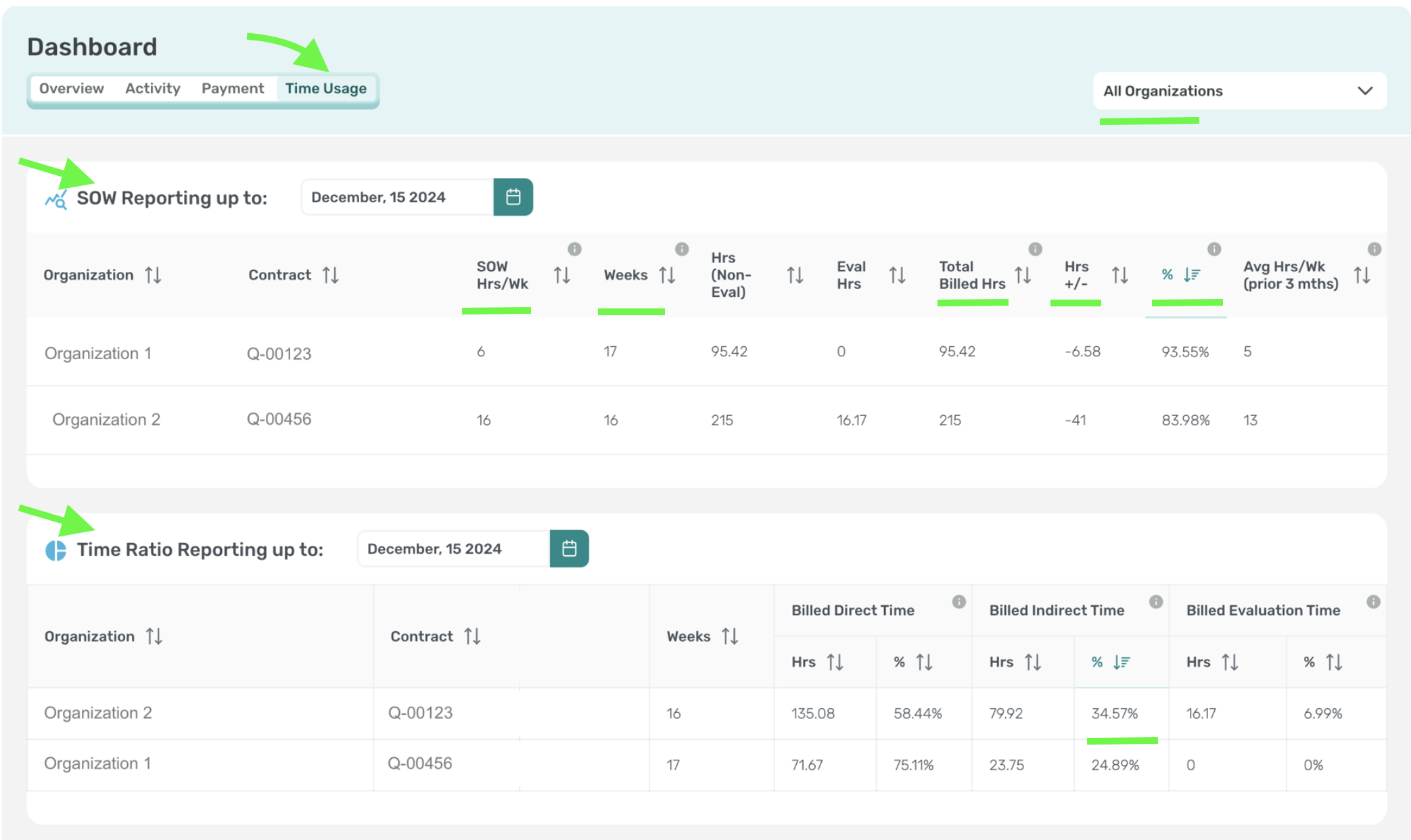
High Traffic Columns:
SOW Reporting
- Total Billed Hrs: Total number of hours billed for this contract, excluding evaluation hours for Per Student Contracts. This is averaged over the indicated number of weeks of direct services.
- Hrs +/-: The number of hours discrepant from your SOW HRs/Week Maximum and Hours documented as worked.
- %: Percentage of SOW hours worked. 100% is full completion of SOW maximum hours.
Time Ration Reporting
- Billed Indirect Hours: The time is automatically calculated based on documented indirect time, which includes Case Management, Record Review, and IEP meetings.