Access assessment materials
eLuma encourages contractors to have a comprehensive assessment battery. Assessments in eLuma’s battery of assessments are housed within Insight™ or on a publisher’s digital platform. A complete list of eLuma’s assessment library and how to access each assessment is available on eLuminate. You can always use other credible assessments in your personal assessment battery.
-
Assessments available on Insight™
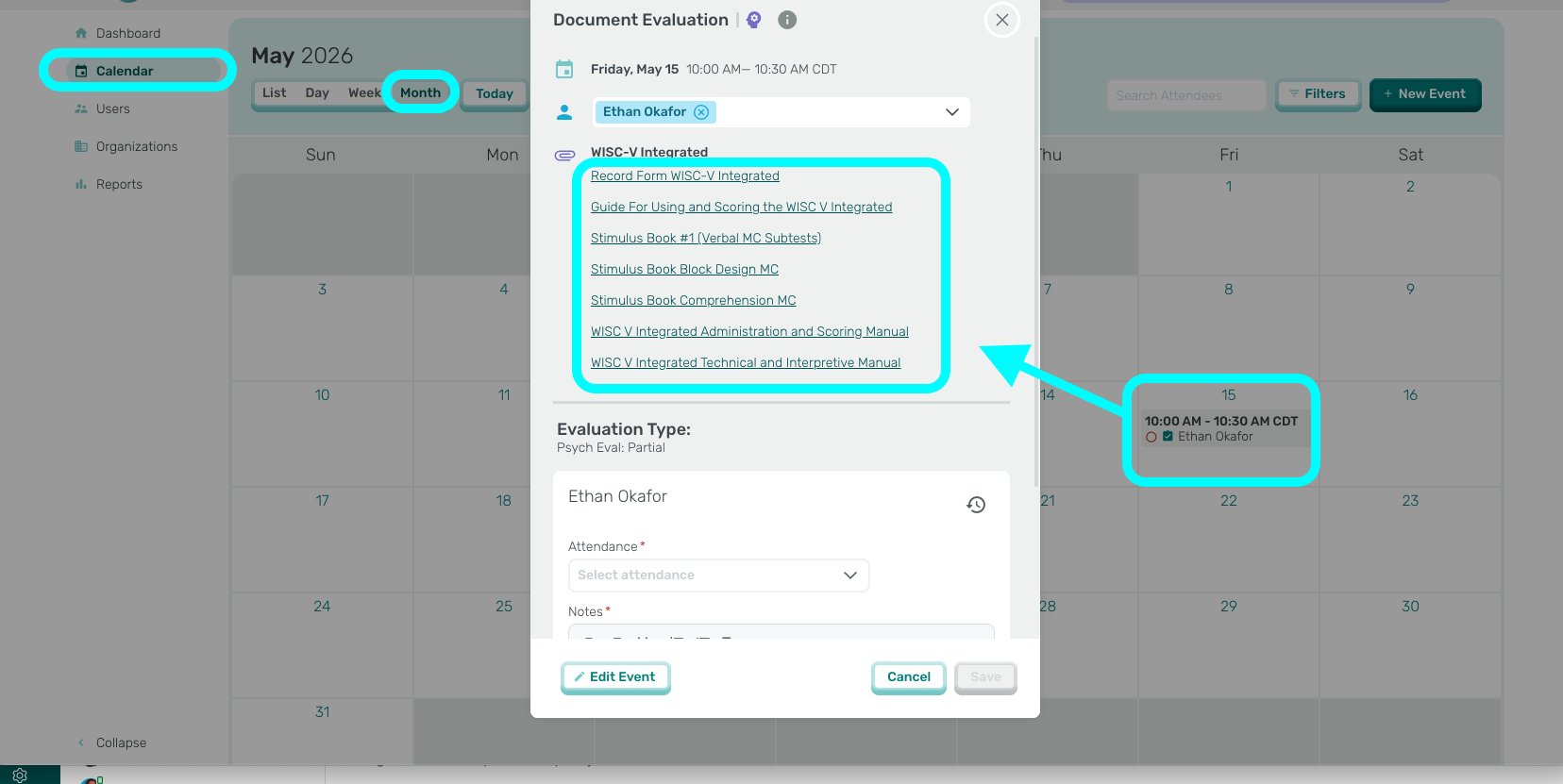
- Available Digital Materials for assessments available on Insight™ will be available once you have scheduled the evaluation event.
- Physical Materials for assessments will be mailed usin the Assessment Request Form
- After you schedule the evaluation and click save, the assessment materials will be available. *If you are unable to schedule evaluation events, check to make sure the student has an active treatment plan for Evlauation Services
- Open the Evaluation Event from your Insight™ Calendar.
- Click on either the Record Form or Materials to download or open in another window.
-
Assessments available on a publisher’s platform
- For assessments available on one of the publisher’s platforms, you will need to complete the Assessment Request Form on eLuminate to gain access or request materials.
- Each platform requires that you create an account and are associated with eLuma.
- Some assessment platforms are pooled resources, others require that inventory is allocated to your account.
- Information about how to access each individual assessment is available on eLuminate.
Submit questions to support@elumatherapy.com